
RMS Insight platform
CargoWise visibility and automation. Built around your workflow.
RMS Insight is a visibility and automation platform designed exclusively for CargoWise. Build and save the right view, deliver it automatically, alert people when attention is needed, control what each audience can access, and extend visibility beyond the reporting portal.
Your information comes from CargoWise. Your reports run on RMS.
RMS brings your CargoWise information into a separate reporting database. Your reports and dashboards use that database—not direct reporting queries against your operational CargoWise database.
One connected RMS platform
Each capability serves a different need while sharing the same RMS data and security foundation.
Reporting is only the beginning.
A conventional BI tool can display information. RMS Insight also helps teams make useful views repeatable, distribute them at scale, monitor defined events, give each audience the right experience and manage adoption after launch.
One platform. Seven connected capabilities.
Each capability supports a different part of the reporting lifecycle, while the shared RMS data and security foundation keeps the overall experience connected.
Prepare the data
Bring the CargoWise data used for reporting into a separate RMS database designed for reports, dashboards, automation and cross-module analysis.
Build the view
Use summaries, charts, maps, detailed tables and pivots with filters, saved criteria, organized folders and supported exports.
Automate delivery
Schedule recurring reports or create personalized report distribution at scale using the delivery process that fits the audience.
Signal attention
Watch configured operational events and timing conditions so people can receive focused email alerts instead of checking every report.
Control access
Align browser dashboards, mobile folders, landing pages and configured data restrictions with each employee or customer audience.
Extend the experience
Connect the RMS portal with customized customer tracking, the installed mobile app and Heads Up shared operational displays.
Manage and integrate
Administer managed API keys, branding, access, delivery setups and activity information as the reporting program evolves.
Different customers. Different requirements. One maintained process.
One customer needs shipments for Local Client ABC123. Another needs XYZ789. Maintain their email addresses and supported filter values in an Excel or CSV template, then let RMS generate their separate report outputs on the configured schedule.
Configure the requirements
Select a supported report, map the customer and date filters, and prepare the recipient template. Date behavior follows the configured mappings or supported presets; fixed spreadsheet dates do not automatically roll forward.
Preview before delivery
Check the resolved recipients and filters, then send an internal test. Confirm that each recipient is authorized to receive the selected information.
Schedule and review
RMS generates the individual attachments and records run results. Maintain the delivery requirements without rebuilding the same report for each customer. Available fields and formats depend on the report.
Three distinct ways to move information forward.
Scheduled Reports, Mass Report Emailing and User Alerts solve different business problems. RMS keeps those functions separate so each process can use the right delivery logic.
Scheduled Reports
Put a saved RMS report on a defined schedule and deliver the supported output without repeating the run-and-send process by hand.
- Daily, hourly, periodic, monthly, quarterly and one-time options
- First- and last-business-day scheduling
- PDF, Excel or CSV output
- Email or FTP delivery with time-zone and naming controls
Mass Report Emailing
Map spreadsheet rows to destination addresses and report filters so RMS can produce a separate, relevant output for each recipient.
- Excel or CSV recipient template
- Fixed and row-mapped filter values
- Validation preview before processing
- Selected days, up to two scheduled times per day, or an on-demand run
- Setup, run and row-level history
User Alerts
Configure reusable event rules and recipient setups around CargoWise-native events or derived RMS events built to reflect what a customer needs to monitor.
- +/- Days Changed: If an estimated event date changes within the selected +/- day range, RMS informs the assigned recipient
- Pre Alert notifies a selected number of days before the estimated event date
- Post Alert notifies after the estimated event date when the actual event has not occurred
- Actioned Today notifies when the event occurs
- Continuous, interval-based or scheduled daily processing
- Summary or Per Event email options
- Recipient scope aligned with an RMS job-security group
Which dates changed? What is due? What is overdue?
Events are not limited to CargoWise-native events. RMS User Alert Groups can also use derived events built from customer data and configured business rules to reflect what a customer needs to monitor. User Alert Setup then assigns the relevant group, security context, timing and delivery style to each recipient.
Define the event around the business need
Use a CargoWise-native event or a derived RMS event, then apply supported estimated, actual or actioned behavior and clear labels that match the customer’s operating process.
Inform the right person when something changes
If an estimated event date changes within the selected +/- day range, RMS informs the assigned recipient. Rules can also notify before that date, alert after it when the actual event has not occurred, or identify activity actioned today.
Control the recipient experience
Use supported processing intervals and send a consolidated summary or separate alert messages as appropriate.
Choose focused updates or a consolidated view.
RMS can deliver User Alerts as individual Per Event messages or as a Summary. The configured event rules, timing conditions and recipient scope determine what each person receives.
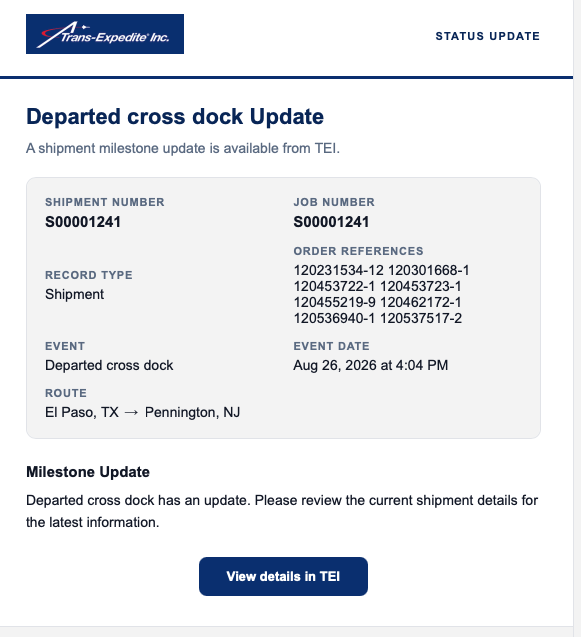
One focused update for a matched event.
Send a dedicated message when a configured native or derived event matches its alert rule. The example brings the shipment, event, event date, route and supporting references together with a direct link to current details.
- Useful when an individual change needs prompt attention
- Provides focused record and event context
- Keeps the latest RMS details one click away
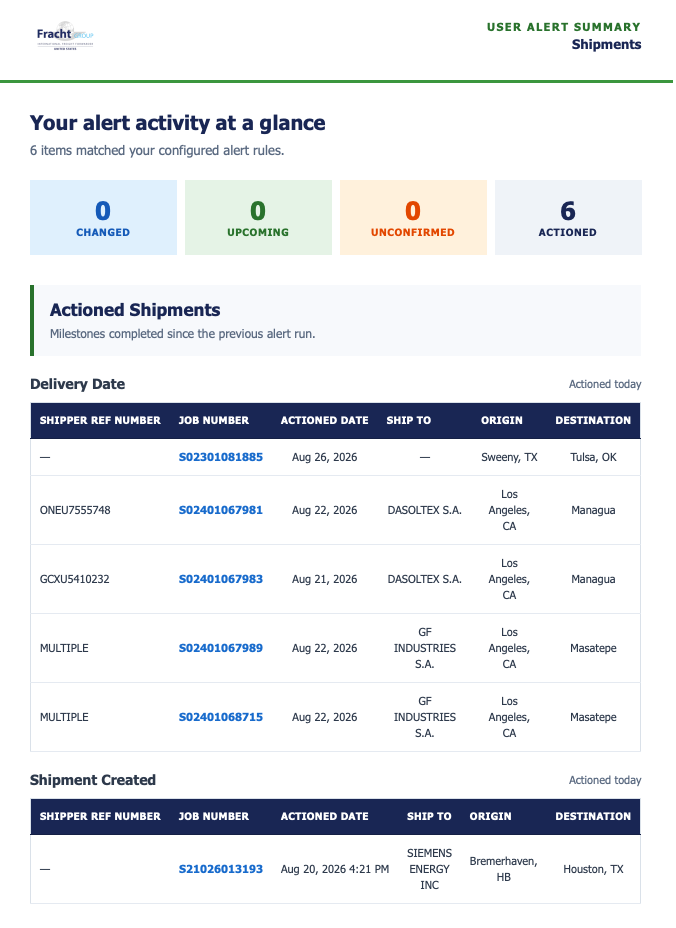
Alert activity organized in one email.
Combine the results of an alert run into a consolidated view. The example shows counts for Changed, Upcoming, Unconfirmed and Actioned activity, followed by the matching records and operational detail.
- Useful for reviewing multiple matches together
- Groups activity by configured alert result
- Links applicable job numbers to current details
The right insight and data scope for every role.
RMS can shape both the reporting experience and the applicable data scope instead of giving every person the same BI workspace.
Control more than a menu.
Configured RMS security can govern browser dashboards, mobile reports and folders, default landing pages and the business data applicable to a user.
- Company, department, branch and client context
- Shipper, consignee, buyer and supplier relationships
- Sales representative, principal and agent scope
- Supported staff assignments and operational responsibility
Operations
Focused workflow, exceptions, timing and supporting detail for the work being managed.
Sales
Customer, quote, follow-up and shipment priorities relevant to the account role.
Managers
Performance, trends and operational signals across the areas they oversee.
Finance
Financial visibility and job-performance context aligned with the access assigned to the role.
Customers
Selected shipment visibility, tracking and reporting appropriate to their freight.
Administrators
Control reporting assignments, automation setups, integrations, presentation and use.
Four connected ways to put RMS information to work.
The RMS experience can follow the business process from an employee’s desktop to customer self-service, a phone or a shared operational display.
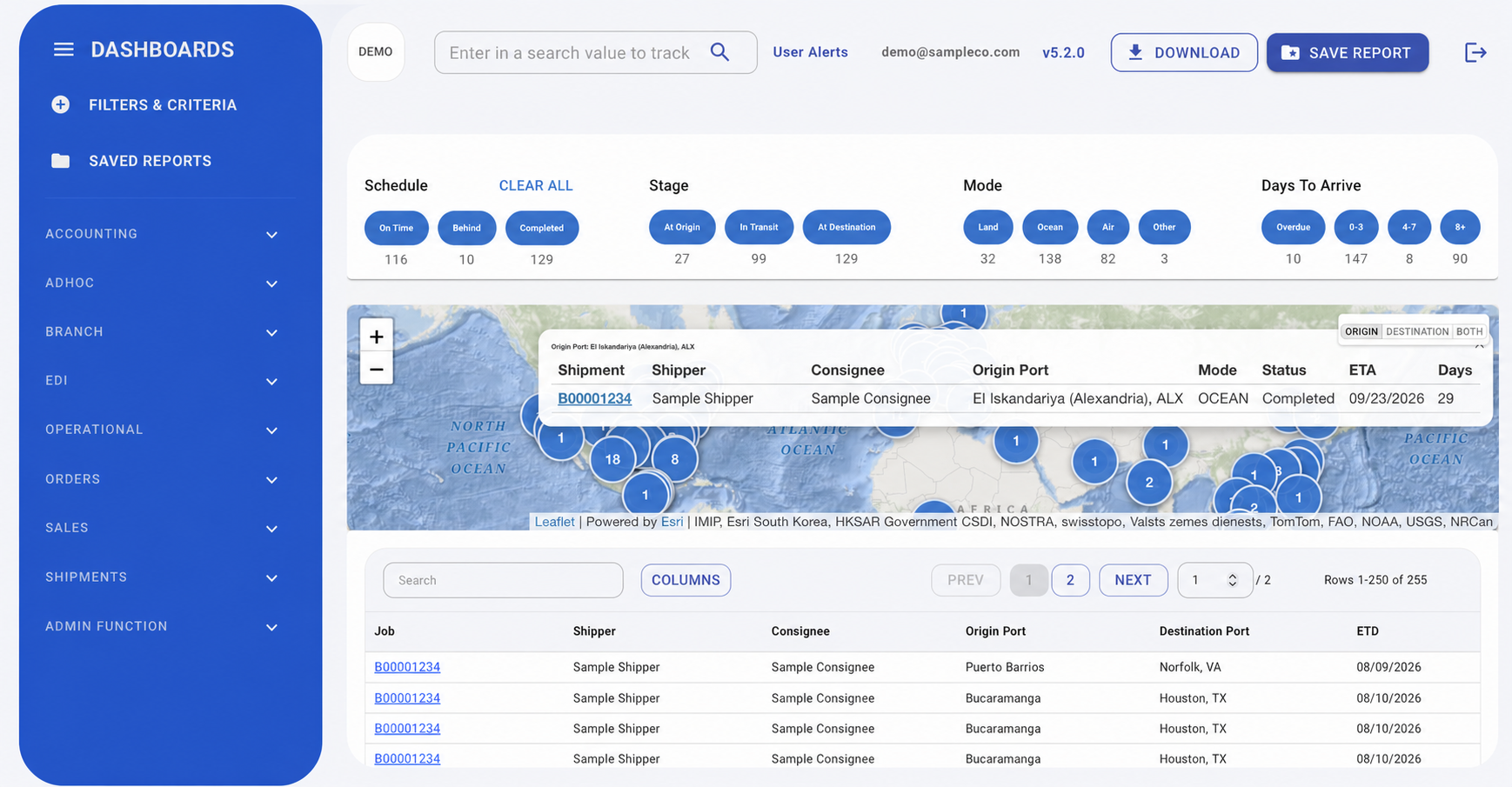
RMS Insight portal
Focused dashboards and reports connect summaries, visual context and the underlying operational detail.
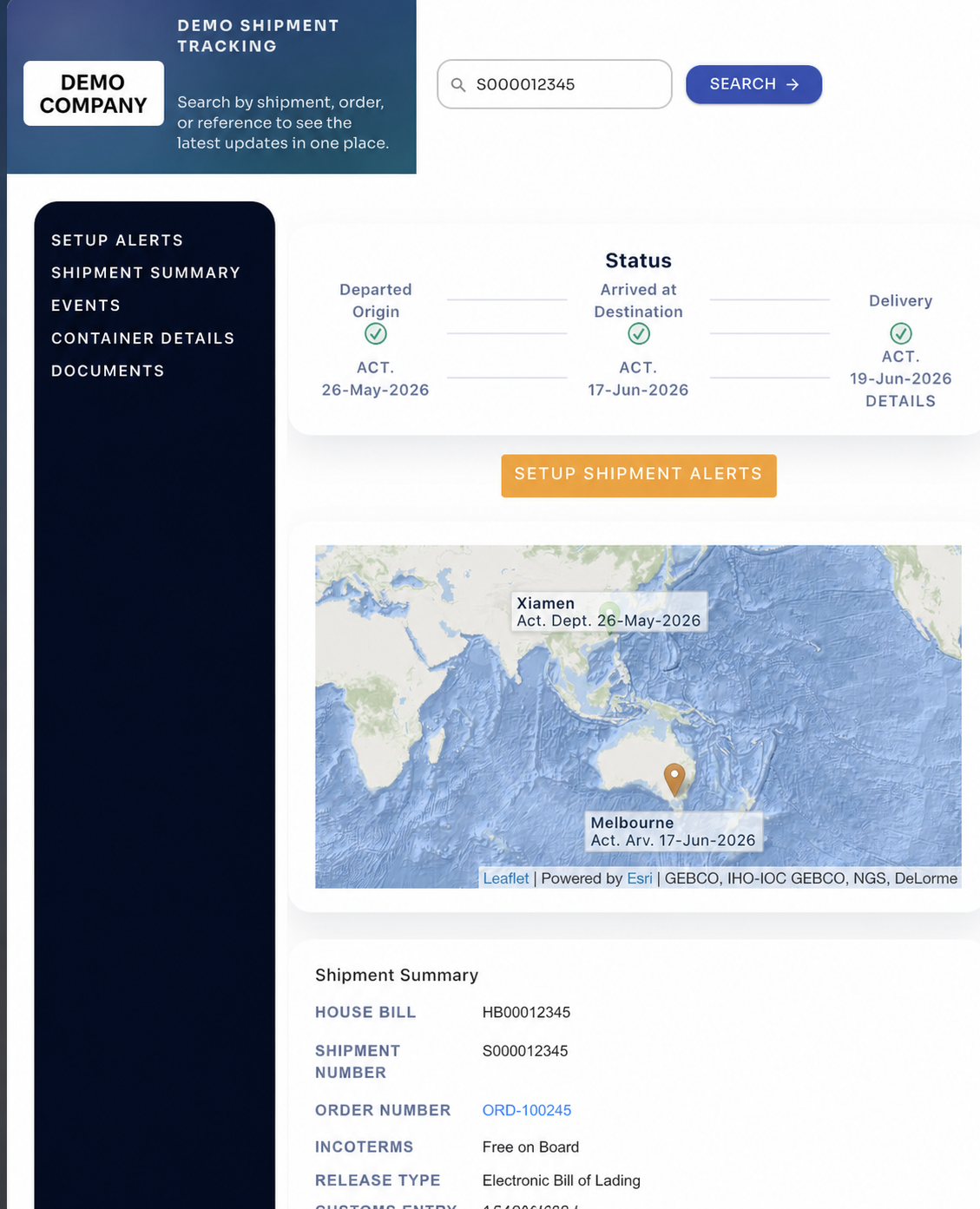
Customer tracking
Customized customer-facing shipment search, status, detail, map and supported alert entry points are included in the RMS Insight base price.
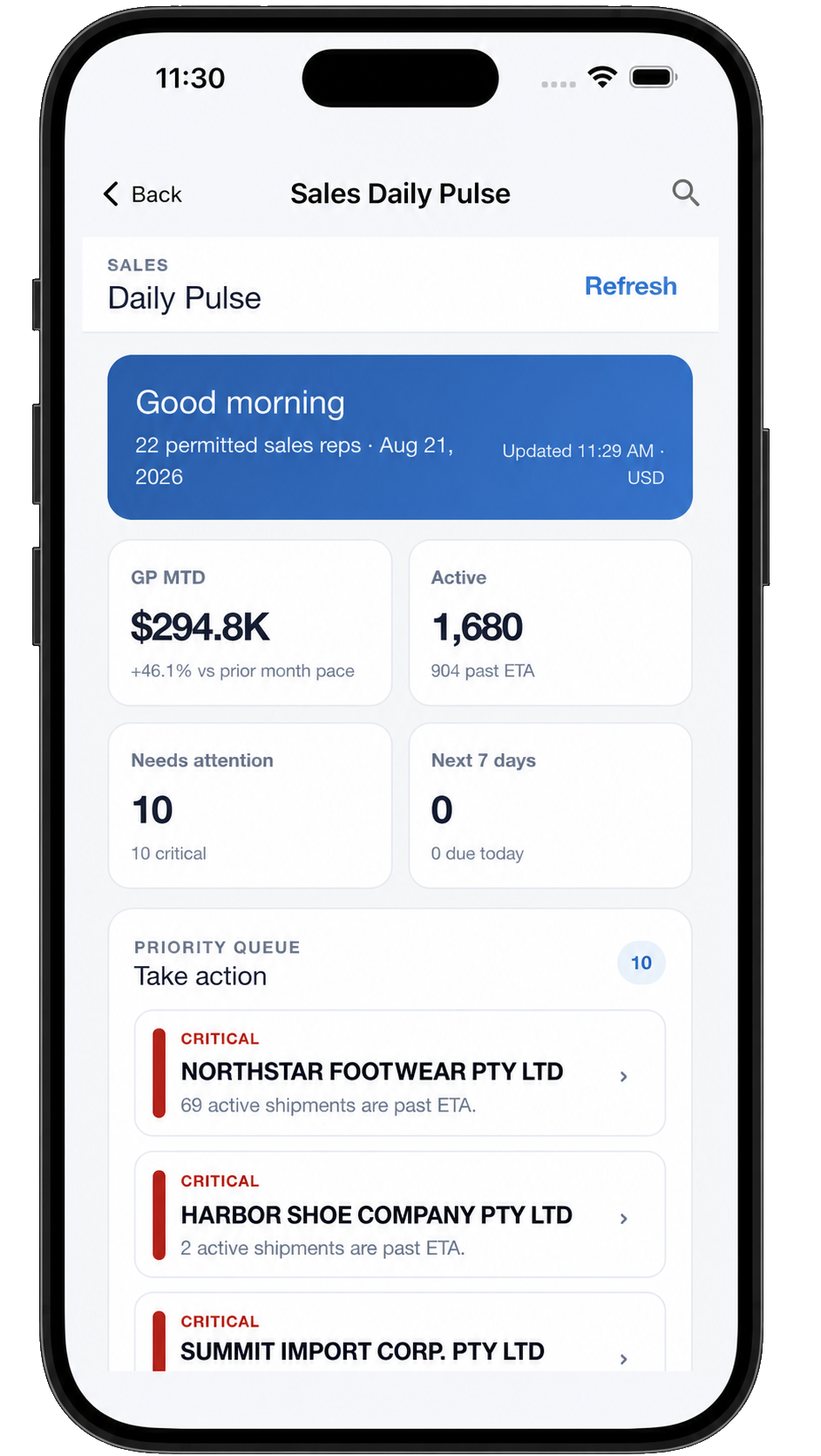
RMS Insight Mobile
Phone-first report categories, shipment search, supported push notifications, unread status and biometric sign-in in an installed app.


Heads Up displays
Create named boards, choose compatible saved reports and rotate them on shared operational screens using configured timing.

Manage the experience after launch.
RMS includes the controls needed to maintain access, supported integrations, delivery processes and adoption as requirements change.
Managed API access
Create, assign, enable, disable, rotate and retire API keys for managed integrations, with an assigned type, description, status and security group.
Brand configuration
Apply supported colors, gradients, chart colors, navigation and application presentation so employee and customer experiences feel deliberate.
Usage and delivery oversight
Review portal activity, login information, public tracking use and supported scheduled or mass-delivery setup and run details.
Reporting runs on RMS—not the live CargoWise database.
RMS incrementally extracts the CargoWise data needed for reporting into a separate RMS database. Reports, dashboards, alerts and delivery processes run against RMS rather than the operational CargoWise database. The RMS process uses no CargoWise XML triggers and requires no CargoWise report configuration. Under standard conditions and with the required access available, deployment can be live in as little as three days.
Explore the RMS data foundation and cross-module reporting coverage
Understanding the platform.
Is Mass Report Emailing the same as a scheduled report?
No. A scheduled report runs one saved view on a recurrence. Mass Report Emailing maps spreadsheet rows to recipients and filters so each row can produce a separate, focused output.
Are User Alerts dashboard notifications?
User Alerts watch configured event and timing conditions across supported records, then use supported email delivery and processing intervals. They are distinct from viewing a dashboard or sending a scheduled report.
Does every audience see the same reports and data?
No. Browser, mobile and data access can be configured for the role and assigned business scope. Exact controls depend on the implementation and available source information.
Is RMS limited to CargoWise shipment reporting?
No. RMS can organize relevant information across supported CargoWise modules and, when configured and authorized, across CargoWise companies. The Reporting Modules page explains the established coverage.
See the complete RMS platform in action.
Tell us which reporting, distribution, alerting or customer-visibility process consumes the most time today. We’ll demonstrate the RMS capabilities relevant to that process.